
Set up all your CCTV cameras in minutes, not hours
Find every IP camera on the network, then set IP address, admin password and time on all of them in one go. No more opening each camera one by one.
Free trial · Windows 10 / 11 (64-bit) · Android app coming soon
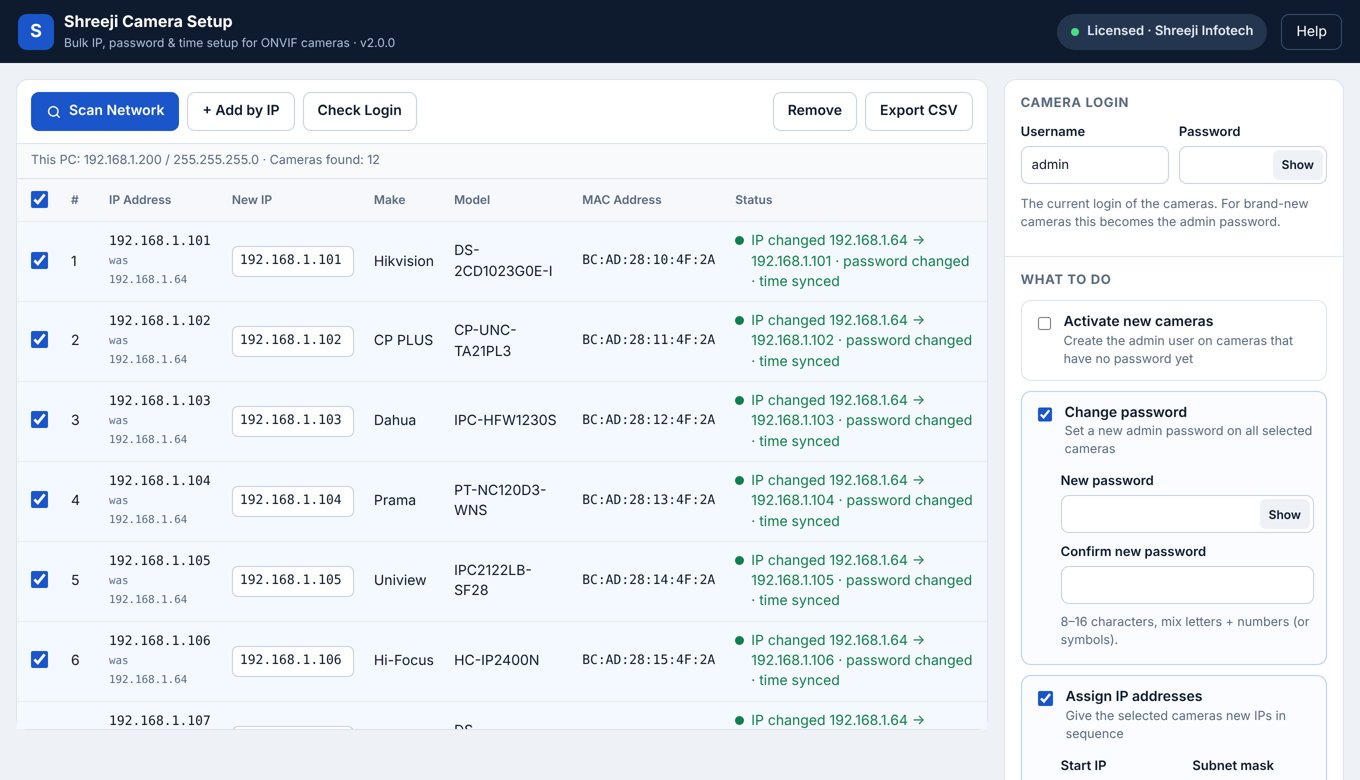
Everything an installer does on site, in one screen
Built by Shreeji Infotech after years of CCTV installations in Ahmedabad.
Scan the network
Lists every ONVIF camera with IP, make, model and MAC. Shows which cameras are new and which need a login.
Bulk IP addresses
Give all cameras IPs in sequence from a start IP, with subnet, gateway and DNS. Used IPs are skipped automatically.
One password for all
Set a strong admin password on every selected camera at once, and activate brand-new cameras that support it.
Time sync (IST)
Set the correct date and time on all cameras from your laptop, so recordings show the right time.
Export for handover
Save the final list of IP, model, serial number and MAC as an Excel (CSV) file for your customer's handover report.
Works offline on site
No internet needed at the site. Internet is only needed once to activate the license.
How it works
Connect
Connect your laptop to the same switch or PoE switch as the cameras.
Scan
Click Scan Network. All cameras appear in the list in a few seconds.
Choose
Enter the login, tick Change password, Assign IP addresses and Sync time.
Apply
Click Apply. Every camera is configured, and you can export the list.
Plans
Try it free on your next site. Buy a license when you need more cameras at once.
License
- Unlimited cameras in one go
- Use on your PC and the mobile app (coming soon)
- Updates and WhatsApp support
Android app · coming soon
Questions
Which cameras does it work with?
Hikvision, CP Plus, Dahua, Prama, Uniview, Hi-Focus and most cameras that support ONVIF. ONVIF must be enabled on the camera.
Can it activate brand-new Hikvision or Prama cameras?
These brands need one-time activation in the maker's own tool (SADP) before ONVIF works. After that, Shreeji Camera Setup sets IP, password and time on all of them together. Many other brands can be activated directly from the app.
A camera shows "Not reachable". What do I do?
Give your laptop an IP in the camera's range. For example, if the camera is 192.168.1.64, set your laptop to 192.168.1.200, then scan again.
Do I need internet at the site?
No. Internet is needed only to activate the license once. After that the app works offline.
How do I move my license to a new laptop?
Open the license window and click Deactivate on the old laptop, then activate the same key on the new one. Or message us on WhatsApp.
Save hours on your next CCTV installation
Download the free trial now. Questions? Call or WhatsApp +91 98795 86899.